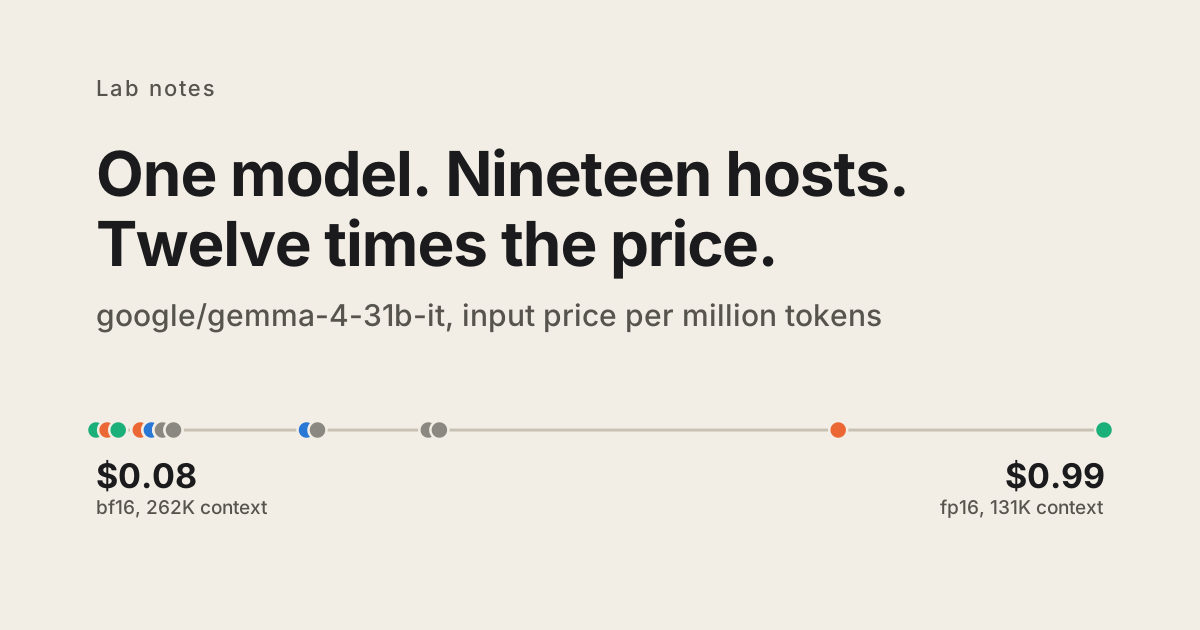
The same open-weight model costs up to 12x more depending on which host answers. The expensive hosts are not serving better weights.
google/gemma-4-31b-it costs $0.08 per million input tokens. It also costs $0.99. Both are true at the same time, on the same router, for the same model id, and which one you pay is decided when your request arrives.
Nineteen hosts serve that model on OpenRouter. The cheapest charges $0.08 and the dearest $0.99, which is 12.4x. We went looking because we bill model usage through to customers at list price and wanted our own numbers to be right, and the answer turned out not to be a number.
<img src="assets/chart.svg" alt="Ten open-weight models, each as a row of dots showing the input price on every host that serves it, normalised to that model's cheapest host. Spreads run from 2.1x to 12.4x. Dot colour marks the weight precision each host serves, and shows no relationship to where the host sits on the price band.">
The expensive host is not the better one
The obvious explanation is that you get what you pay for. Cheap hosts run models at reduced precision, so the $0.08 endpoint is a quantized one and the $0.99 endpoint is the real thing.
That is not what the data says.
OpenRouter publishes the quantization and context window each host serves. For Gemma 4 31B, the $0.08 host serves bf16 weights with a 262K context window. The $0.99 host serves fp16 with 131K. The cheapest option is higher precision and double the context, at a twelfth of the price.
It holds on the bigger models too. GLM 5.2 runs from $0.50 to $2.31, and both ends serve fp8 at a 1M context window: same precision, same window, 4.6x apart. DeepSeek V4 Pro is cheapest from DeepSeek themselves at $0.435 and costs $1.74 from Fireworks. Kimi K3 has two endpoints from the same provider, same quantization, at $2.80 and $6.00.
Colour the dots by precision and no pattern appears. Sorting hosts by price does not sort them by anything else.
Nobody is choosing this
A price range would be a footnote if you picked a point in it. You don't. The router picks per request.
We called DeepSeek V4 Pro twice, a few minutes apart, with the same request. The first call billed $0.54 per million input tokens and the second $1.30. No price changed in between. Two different hosts answered.
So this is not a case of some teams sitting on an expensive host and needing to switch. One application, calling one model id, pays a different price from call to call, and what it averages out to is set by whatever the router's load balancing did that day.
The same mechanism moves things that are not money. GLM 5.2's 32 hosts advertise context windows from 97K to 1,049,576 tokens. Build a feature on the million-token window and it works or fails depending on which host takes the request.
Pinning is one line
OpenRouter takes a routing preference per request, and pinning removes the variable:
body: JSON.stringify({
  model: "deepseek/deepseek-v4-pro",
  messages,
  provider: { only: ["deepseek"], allow_fallbacks: false },
})
With a host pinned, the price is a number you chose, a price change shows up as a change instead of as noise, and the context window you tested against is the one you get.
Pin deliberately rather than pinning cheapest. The correlation between price and precision is absent across hosts, which is the finding, but that does not make it absent within any given pair: gpt-oss-120b's cheapest host does serve 4-bit weights, and five of its twenty hosts do. The point is that you cannot infer precision from price, so you have to read both. They sit in the same endpoints response.
Turning fallbacks off has a cost of its own. A pinned host that goes down takes your requests with it, where an unpinned call would have quietly gone somewhere else. Pinning an ordered list rather than a single host keeps most of the determinism and some of the resilience.
Check yours
Every number here comes from OpenRouter's public endpoints API, one request per model, no key required:
GET https://openrouter.ai/api/v1/models/{author}/{slug}/endpointsThe response carries one entry per host with pricing, quantization, and context_length. Sort by price and read across. The script that drew the chart above does exactly that and nothing else.
If you route open-weight models through OpenRouter and have never looked at this, the spread on your top few models is worth ten minutes.